








Description
🏹 Arrow Defense - Solve Puzzles, Release Arrows & Defeat Monsters
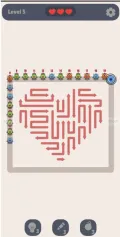
Arrow Defense is a complete Unity game project that combines puzzle-solving mechanics with strategic tower defense combat. Players must carefully release arrows from a puzzle board and send them into battle, where they automatically attack incoming monsters.
This unique gameplay combination challenges players to think strategically while managing their defenses. Choosing which arrows to release and making effective use of available upgrades and boosters are important parts of progressing through the game.
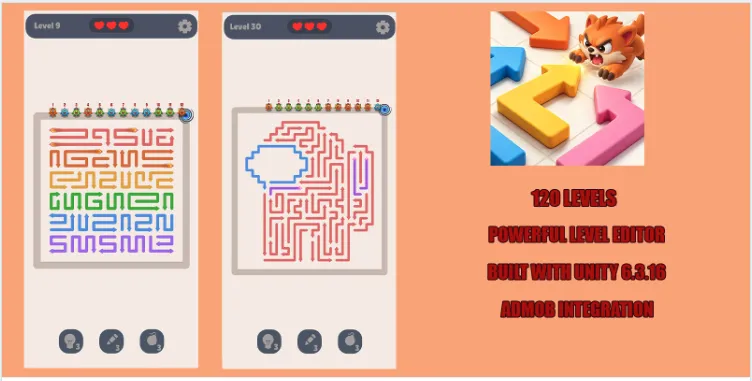
Developed with Unity 6.3.16, this template includes 120 playable levels, multiple arrow types, different monsters, an upgrade system, an in-game economy, and a flexible Level Editor.
The project also includes monetization systems, a complete user interface, sound and music, and a life system. Its organized project structure makes it easier to customize graphics, adjust gameplay parameters, create additional levels, and develop your own version of the game.
Whether you want to study the underlying systems, customize an existing project, or build a new puzzle defense game, Arrow Defense provides a ready-made starting point.
🎮 Core Gameplay
The main gameplay revolves around releasing arrows from the puzzle board and using them to defend against incoming monsters.
Gameplay Loop
1. 🧩 Examine the arrow puzzle board.
2. 🏹 Strategically release arrows.
3. ⚔️ Send arrows into battle.
4. 👾 Attack incoming monsters.
5. 🪙 Collect and manage in-game resources.
6. ⬆️ Upgrade arrows and gameplay attributes.
7. 🎯 Progress through increasingly challenging levels.
The combination of puzzle decisions and automatic combat creates a distinctive defense experience.
🏹 Multiple Arrow Types
Arrow Defense includes four arrow types, each offering a different elemental or standard attack theme.
- Normal Arrow: The standard arrow type.
- Fire Arrow: An elemental fire-themed arrow.
- Ice Arrow: An elemental ice-themed arrow.
- Lightning Arrow: An elemental lightning-themed arrow.
These arrow types provide variety for the puzzle and combat systems.
👾 Monster Battles
The game features different monsters with unique characteristics. Players release arrows from the puzzle board to attack incoming enemies and defend against their advance.
The monster variety adds another layer to the core puzzle-defense gameplay.
🧩 120 Playable Levels
Arrow Defense includes 120 levels ready for players to explore.
The supplied project also includes a Level Editor, allowing developers to create additional levels and customize existing layouts without building every stage manually.
Level Creation Features
- Configure and customize levels.
- Modify existing level layouts.
- Create additional puzzle challenges.
- Test gameplay changes.
- Expand the game with new content.
🛠️ Powerful Level Editor
The built-in Level Editor makes it easier to manage level content and adjust gameplay.
Developers can use the editor to create new challenges and customize the existing level collection. This can reduce repetitive manual setup when expanding the game.
⬆️ Arrow & Gameplay Upgrade System
The template includes an upgrade system for arrows and gameplay attributes.
These systems provide a foundation for progression, allowing developers to customize how upgrades work and how players develop their abilities.
⚡ Booster System
Arrow Defense includes boosters designed to help players during gameplay.
The booster framework provides another gameplay element that can be adjusted to suit your preferred difficulty and progression design.
❤️ Life System
A complete life system is included in the project.
Developers can customize this system as part of the game's overall progression and gameplay flow.
🪙 Coins & In-Game Economy
The template includes a coin system and an in-game economy.
This provides a foundation for managing in-game resources and connecting them to progression or upgrade mechanics.
💰 Monetization Integration
Arrow Defense includes advertising and in-app purchase integration.
Google AdMob
- Banner advertisements
- Interstitial advertisements
- Rewarded advertisements
In-App Purchases
The project includes an In-App Purchase integration, providing a starting point for implementing supported purchase options.
Monetization accounts, store configuration, product setup, and testing may be required before publishing.
🎨 Easy Customization & Reskinning
The project uses a clean and organized structure designed to make customization easier.
You can modify or replace:
- Graphics and visual assets
- User interface elements
- Arrow types and parameters
- Monster content
- Level layouts
- Gameplay settings
- Upgrade attributes
- Other game elements
This flexibility makes the template suitable for creating a personalized version of the original game.
📱 Mobile-Ready Project
Arrow Defense is described as mobile-optimized and ready for Android and iOS development. WebGL is also listed as a supported platform.
Before publishing, developers should test the project on their intended devices and complete any platform-specific configuration.
⭐ Key Features
- 🏹 Complete arrow defense puzzle gameplay
- 🧩 Puzzle-solving combined with tower defense
- 👾 Monster battle system
- 🔥 Normal, Fire, Ice, and Lightning arrows
- 🎯 120 ready-to-play levels
- 🛠️ Flexible built-in Level Editor
- ⬆️ Arrow and gameplay upgrade system
- ⚡ Booster system
- ❤️ Complete life system
- 🪙 Coin and in-game economy system
- 🎨 Complete user interface and game flow
- 🎵 Sound and music system
- 💰 Google AdMob integration
- 📢 Banner, interstitial, and rewarded ads
- 🛒 In-App Purchase integration
- 🧑💻 Organized Unity project architecture
- 🎨 Easy to customize and reskin
- 📱 Mobile-optimized gameplay
- 🤖 Android and iOS ready
- 🌐 WebGL listed as a supported platform
- 🛠️ Built with Unity 6.3.16
📦 What You Get
Based on the supplied project details, the template includes:
✅ Complete Unity project
✅ Full arrow puzzle and defense gameplay system
✅ Four arrow types
✅ Different monster types
✅ 120 levels
✅ Built-in Level Editor
✅ Upgrade system
✅ Booster system
✅ Life system
✅ Coin and economy system
✅ UI and game flow
✅ Sound and music system
✅ AdMob advertising integration
✅ In-App Purchase integration
✅ Customizable graphics and gameplay parameters
🎯 Perfect For
Arrow Defense is suitable for:
- 🏹 Arrow puzzle games
- 🛡️ Tower defense games
- 🧩 Puzzle and strategy games
- 👾 Monster battle games
- 📱 Casual mobile games
- ⚡ Hybrid casual game projects
- 🛠️ Developers who need a Level Editor
- 🎨 Game reskin projects
- 💰 Ad-supported game projects
- 🛒 Games with in-app purchases
- 👨💻 Unity beginners learning game systems
- 🎮 Indie developers and game studios
⭐ Why Choose Arrow Defense?
🧩 A Distinctive Gameplay Combination
Combine arrow-based puzzle decisions with automatic monster combat for a different take on defense gameplay.
🏹 Four Arrow Types
Normal, Fire, Ice, and Lightning arrows provide multiple types of content to work with.
🎯 120 Included Levels
Start with a substantial collection of playable levels instead of creating every stage from scratch.
🛠️ Built-In Level Editor
Create and customize level layouts using the included editing tools.
⬆️ Progression Systems
Arrow upgrades, boosters, lives, and coins provide multiple systems to customize.
💰 Monetization Framework
AdMob and In-App Purchase integrations provide a starting point for implementing monetization.
🎨 Customization-Friendly Structure
Modify graphics, monsters, arrows, level layouts, and gameplay parameters to create your own version.
🔧 Technical Details
Specification Details
Unity Version Unity 6.3.16
Game Genre Puzzle / Tower Defense / Strategy
Levels 120
Arrow Types Normal, Fire, Ice, Lightning
Level Editor Included
Advertising Google AdMob
Ad Formats Banner, Interstitial, Rewarded
In-App Purchases Integrated
Upgrade System Included
Booster System Included
Life System Included
Economy System Coins and in-game economy
Graphics Customizable
Android Supported
iOS Supported
WebGL Listed as supported
Requirements
- Unity 6.3.16
- Required Unity modules for your intended build platform
- Google AdMob account for advertising configuration, if required
- Google Play Developer account for Android publishing
Make sure the necessary platform modules are installed through Unity Hub before opening and building the project.
Arrow Defense - Complete Unity Template
Arrow Defense is a complete Unity game template that combines strategic arrow puzzles with tower defense and monster battles. Release arrows from the puzzle board to attack incoming enemies, upgrade arrow abilities, use powerful boosters, and progress through 120 levels. Built with Unity 6.3.16, it includes a Level Editor, AdMob, in-app purchases, and customizable gameplay systems.
$39.00
Product Details
- Categories:
- Unity Version: 2021.3+
- Files Included: .cs, .csproj, .dll, .prefab, .unityproj, .xml, build.settings
-
Platforms:
Android / iOS
- Last Update: Oct 13, 2026
Trust Features
-
Fully Tested & Optimized Code -
Project Demo Available -
Instant Download after purchase -
Developer Support Included