Description
🎮 Arrow Out 3D Unity Puzzle Game Template
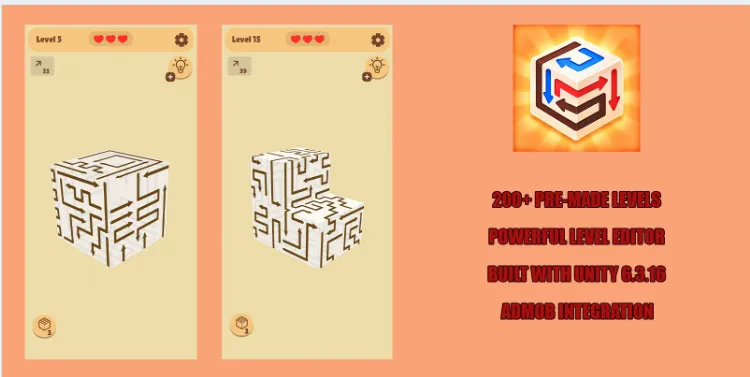
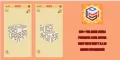
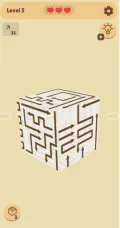
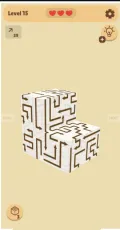
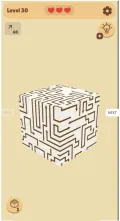
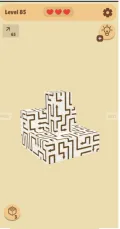
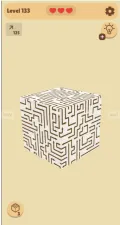
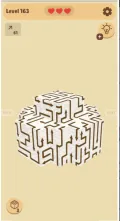
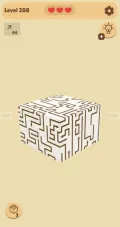
Arrow Out 3D is a complete Unity puzzle game project designed for developers who want to create, customize, and expand a 3D puzzle experience. Built with Unity 6.3.16, the project includes a functional gameplay system, more than 200 pre-made levels, and a powerful Level Editor for creating and editing puzzles directly inside Unity.
The game features multiple level types with different layouts and challenges, giving developers a foundation for building varied puzzle experiences. Its hint and grid boosters provide additional gameplay assistance, while the life management system and complete UI system support the overall player experience.
The project uses a clean, organized structure with easy-to-understand source code, making it suitable for customization, reskinning, and further development. Google AdMob integration is also included, with banner, interstitial, and rewarded advertising options.
🧩 Key Gameplay Features
- 200+ Puzzle Levels: Includes more than 200 pre-made and carefully tested levels.
- 3D Puzzle Gameplay: A complete gameplay system for a three-dimensional puzzle experience.
- Multiple Level Types: Different layouts and challenges provide gameplay variety.
- Built-In Level Editor: Create and customize levels directly inside Unity.
- Hint Booster: Includes a booster to help players with challenging puzzles.
- Show Grid Booster: Provides a grid-related gameplay assistance feature.
- Life Management System: Includes a complete system for managing player lives.
- Complete UI System: Provides the user interface required by the game.
- Expandable Content: Add new levels and customize existing gameplay content.
🛠️ Level Editor and Customization
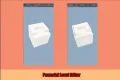
One of Arrow Out 3D's main features is its built-in Level Editor. Developers can create, edit, and customize levels directly inside the Unity Editor without relying solely on pre-made content.
The editor and organized project structure provide a starting point for:
- Creating new puzzle layouts
- Editing existing levels
- Adjusting level challenges
- Expanding the game with additional content
- Customizing graphics and other visual elements
- Reskinning the project for a different presentation
💰 Monetization Features
Arrow Out 3D includes Google AdMob integration with the following advertising formats:
- Banner Ads: Display banner advertisements.
- Interstitial Ads: Show full-screen advertisements at configured points.
- Rewarded Ads: Offer advertisements in exchange for in-game rewards.
To enable advertising, configure your own AdMob account and advertising identifiers. Test all ad placements before publishing and ensure the implementation follows the relevant advertising provider's policies.
📦 What You Get
- Complete Unity 3D puzzle game project
- C# source code included in the project
- 200+ pre-made levels
- Multiple level layouts and puzzle types
- Built-in Level Editor
- Hint booster system
- Show Grid booster system
- Life management system
- Complete UI system
- Google AdMob integration
- Banner, interstitial, and rewarded ad support
- Organized project architecture
- Project documentation
🛠️ Technical Requirements
- Unity Version: Unity 6.3.16
- Game Type: 3D puzzle game
- Platforms: Android, iOS, and WebGL
- Monetization: Google AdMob integration
- Development Environment: Unity Hub and the required Unity Editor modules
Install the required platform modules through Unity Hub before opening and building the project. Specific additional dependencies should be checked in the included project documentation.
📱 Supported Platforms
- Android: Build an Android version using the appropriate Unity modules.
- iOS: Prepare an iOS build using the relevant Unity platform tools.
- WebGL: Build a browser-based version using the appropriate WebGL module.
Test the project on the intended platform and verify performance and functionality before release.
📖 Installation Instructions
1. Download and extract the project files.
2. Open Unity Hub and install Unity 6.3.16 with the required platform modules.
3. Add the extracted project to Unity Hub.
4. Open the project using the specified Unity version.
5. Allow Unity to import assets and resolve project dependencies.
6. Read the documentation located in the project folder.
7. Open the appropriate game scene and test the gameplay.
8. Explore the Level Editor to create or customize levels.
9. Configure Google AdMob and your own ad identifiers if monetization is required.
10. Select your target platform, configure the build settings, and test the resulting build.
📥 Download Android Demo
Try the game before customizing the source project.
Download Arrow Out 3D Demo APK
🚀 Who Is This Template For?
- Unity developers creating 3D puzzle games
- Indie developers looking for an editable puzzle project
- Game studios that need a built-in level creation workflow
- Developers interested in AdMob monetization
- Creators who want to reskin and customize a Unity game
- Developers targeting Android, iOS, and WebGL
💎 Why Choose Arrow Out 3D?
Arrow Out 3D combines a ready-made 3D puzzle system with more than 200 levels and a built-in Level Editor. Its organized project structure makes it easier to explore the source code, modify existing puzzles, and expand the game with additional content.
The hint and grid boosters, life management system, UI components, and AdMob integration provide useful starting points for developing a customized puzzle game across supported platforms.
Arrow Out 3D - Complete Unity Project
Arrow Out 3D is a complete 3D puzzle game template developed with Unity 6.3.16. It features more than 200 carefully designed and tested levels, multiple puzzle layouts, a built-in Level Editor, hint and grid boosters, and a complete life management and UI system. With Google AdMob integration and support for Android, iOS, and WebGL, this project provides a customizable foundation for developing and expanding a 3D puzzle game.
$48.99
Product Details
- Categories:
- Unity Version: 2021.3+
- Files Included: .cs, .csproj, .dll, .prefab, .unityproj, .xml, build.settings
-
Platforms:
Android / iOS
- Last Update: Oct 13, 2026
Trust Features
-
Fully Tested & Optimized Code -
Project Demo Available -
Instant Download after purchase -
Developer Support Included